
https://imuosc2.composers-inside-electronics.com
Table of Contents
Introduction to the imuosc2 web application
Here is sample video showing QR code for access to imuosc2 web application started on a Andoid phone that sends messages for control of sounds and other types of objects for sound and motion for installations and performance. In the example, the motion information is sent to an audio generation patch implemented in Cycling 74 Max or other tools.
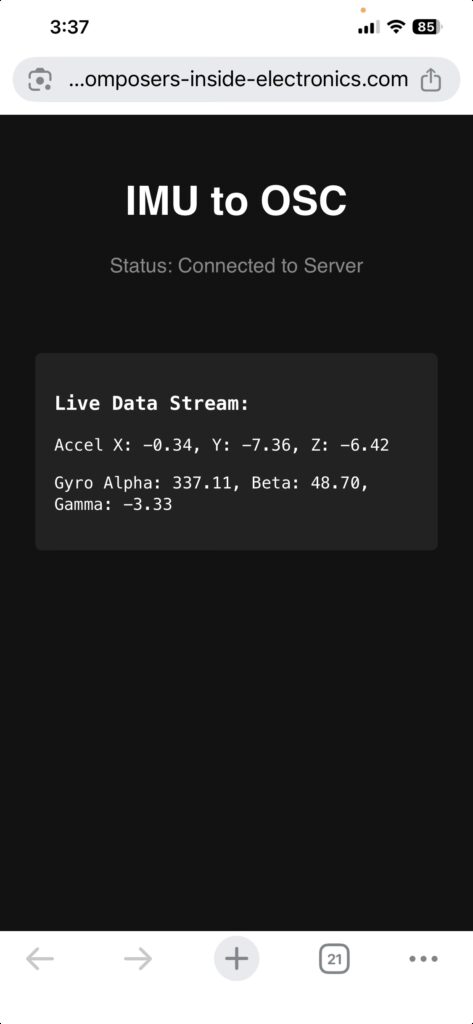
Here is a screen snapshot from an iPhone after scanning the QRcode.
This page is intended to:
- provide background and explanation of the tools and techniques
- track status, debugging, feature enhancement and future considerations and use
- technical tutorial and working repository for code and configuration
This is a proof of concept implementing a framework to be used for a number of creative projects.
Here is a summary of intended features:
- ease of use for users (aka visitors, listeners, participants) to interact using their own devices
- low cost mostly open source hardware and software and free tier internet services
- secure, portable, scalable, extensible, maintainable, explicable
- bring your own device
- software based and commodity hardware
- mobiel device platform independent (iPad, iPhone, Android)
- use of AI tools (Gemini and Claude) for code generation, configuration and problem solving
- Interface with common software tools such as Max, Ableton and PD and other Digital Audio Workstations (DAW)
- easy to integrate with other low cost hardware such as Arduino Single Board Computers for various kinds of device control (e.g. DMX)
This motion control capability is found in specialized applications such as GyroOSC, Mira (from Cycling 74) and AR applications. Here, this is accomplished without the need to install applications from Apple and Amazon app store Access is accomplished simply be scanning a QR code to access the imuosc2 web app.
Google Gemini AI tool was used to generate a web application (HTML and node.js) that accesses Inertial Motion Unit (IMU: gyroscope, accellerometer) as found on all modern mobile devices (iPhone, Android, iPad). The motion information is then sent to backend server that then forwards the parameters via Open Sound Control (OSC) for sound generation and processing. The intent there is then to use the motion information to control other types of devices such as rotating loudspeakers, lighting and computer generated images. OSC is a common protocol for music production and live performance.
This proof of concept uses common secure internet methods to access the restricted sensors on mobile devices including GPS, microphone, camera and IMU allowing a user to simply scan a QR code to start the application without downloading specialized appplications and approving required access.
Part of the output from Gemini addresses techical security considerations necessary for the implementation.
Chronology
- Original concept sketches from ~2023 using Mira, GyroOSC and self-signed certificate
- As of July 25, the web service accessed from the QR code and related URL is running on small single board computer (in this initial proof of concept, an RPI5) accessible via public DNS address.
- As of July 26, configured ngrok and running standlone on m1 laptop. This allows minor changes to run backend on gallery and other guest wifi networks (galleries and other venues)
An internet service called Cloudflare offers a free tier that is used to provide security certficate for composers-inside-electonics.com domain for this and the other receent proof of concept app Shared Convolution.
A utility called Caddy is used as reverse proxy for this and other node.js applications in conjunction with Cloudflare (currently under composers-inside-electronics.com domain) forming a framework for development of other web based applications for interactive installations and performance.
The ngrok internet service support high degree of portabilty
Notes:
- the initial proof of concept doesn’t cleanly handle multiple devices . That capability will be added in the near future.
- The initial Gemini response explained the need and role of the certificate and alternative for self-signed or the “ngrok” service. The initial working verion here used certificate from Cloudflare.
OSC message stream is sent to MAX patch running on separate computer on the local network.
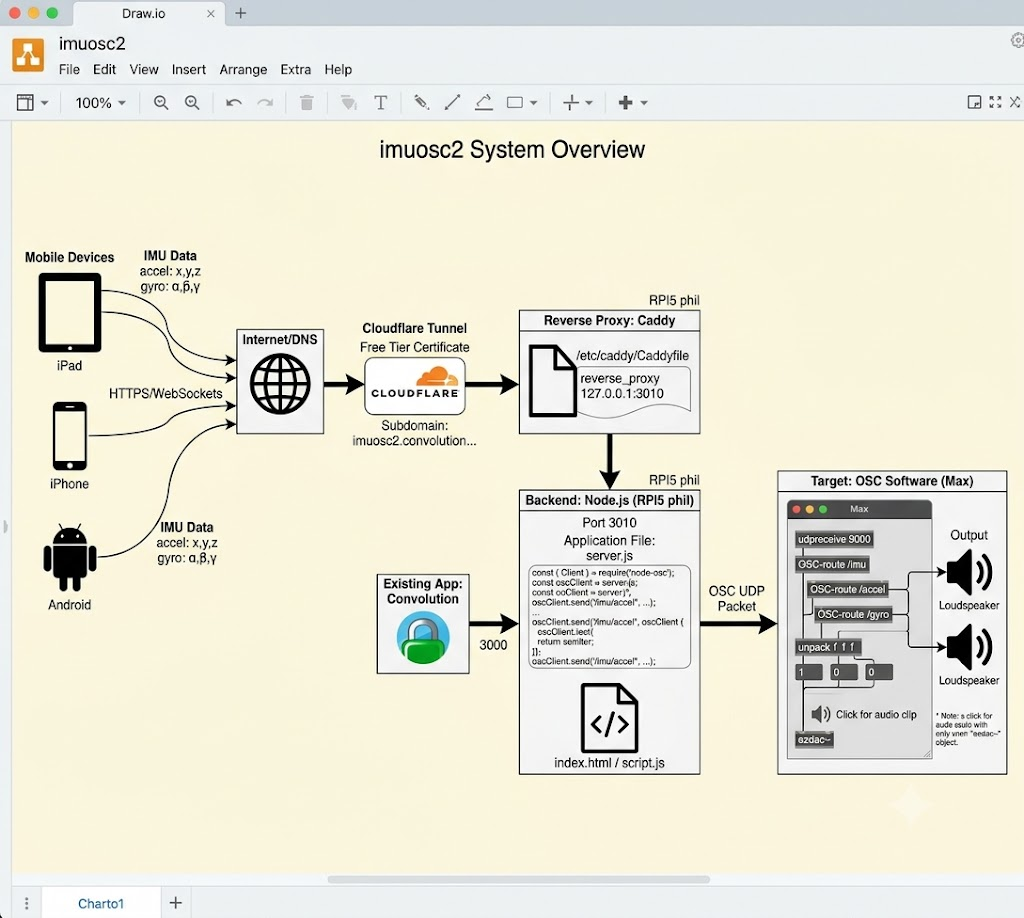
Gemini Generated Diagram
Google Gemini was able to produce a relatively ok block diagram from the information on this page as below.
Errata:
- errors due to stale data on the page
- reverse proxy IP address and ports needs to be corrected
- the OSC Max patch is a little mangled
Status (reverse chronology)
- As of July 26, working with ngrok on m1 independendent of Cloudflare and Caddy
expand for details on ngrok
- downloaded ngrok
- created account
- obtained configuration details
- copied imuosc server.js and index.html to JS/imuosc2 folder
- copied and adjusted from OSC on port 9000 and current IP address of m1
- started ngrok
- started Max
- all functioning from iPhone
https://earshot-esteemed-july.ngrok-free.dev -> http://localhost:3000
- Working version end-to-end as of July 25: configured cloudflare tunnel with assistance from Jakob Edelstein) so page now renders and updates on iPad, iPhone, Android. need to restart on desktop to flush cache. Implemented and verified simple MAX patch for audio generation.
- Debugging as of July 24. – page rendered with local ip but not via eternal public DNS with Cloudflare cerficate.
To Do
- improve scalability: add device or session identifier for handling of multiple concurrent devices and users
- improve portability e.g. ease of configuration via VPN or other solutions suitable for galleries with limited simple guest wifi
- add compass – allows fixed physical orientation
- add GPS for location dependent sound walks
- DONE July 26: portable version for backend implemented with ngrok
- provide sample using PD in addition to MAX for sound generation
- add multi user support
- support inter-user interaction
- e.g. correlated origientation (gyroscope)
- support inter-user interaction
- distribute on github
- improved video recording
- Integrate with Rotating Loudspeaker Ableton set to control sound and motion
- gesture record, playback and modulations
- multi-user interactions
- extend sound range
- extend user controls e.g. allow user to select how the motion influences sounds and objects
- integrate with other projects
- improve multi-channel output
Future usage might include:
- spooky action at a distance (remote access, networked performance and installations)
- GPS location activated sound installations and sound walks
MAX OSC Listener
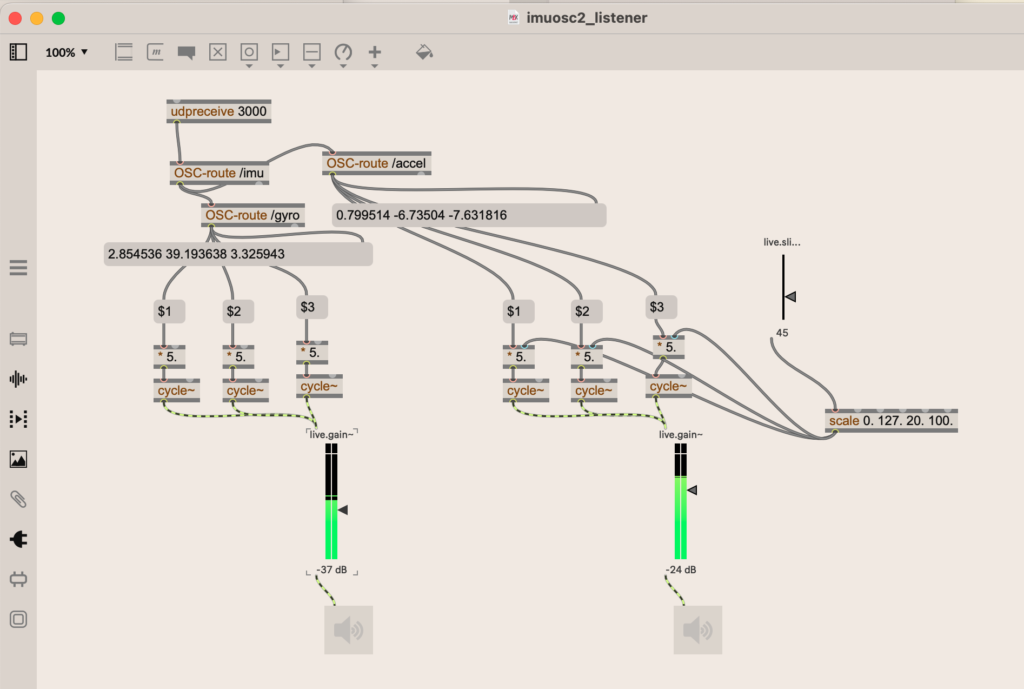
A simple MAX patch to generate sound from the OSC gryo and accel messages has been implemented. The paramaters from the accelerometer and gyroscope are used to control a bank of audio oscillators and output to loudspeakers.
Note; This is the home network version. For the portable laptop version, the udpreceive port is modified.
Click for details explaining the patch
The “udpceive” object listen for OSC messages send from mobile device to node.js to MAX (or PD, Ableton, etc).
The OSC-route objects parse the message into output from gyroscope and accelerometer.
The cycle objects are tone generators.
The ezdac~ object send the reulting audio to loudspeakers.
A slider is provided to adjst the range of the accelerometer.
The $* objects split the x,y,z parameters from the gyro and accelerometer into separate variable.
A fixed multiplier value of 5. is used to take the raw gyroscope parameters and map to audio frequencies.
The live.gain sliders control the volume of the generated audio.
Click here for clip of the source for the above Max patch
{
“boxes” : [ {
“box” : {
“maxclass” : “newobj”,
“text” : “scale 0. 127. 20. 100.”,
“patching_rect” : [ 729.0, 313.0, 123.0, 22.0 ],
“numinlets” : 6,
“id” : “obj-38”,
“numoutlets” : 1,
“outlettype” : [ “” ]
}
}, {
“box” : {
“maxclass” : “live.slider”,
“varname” : “live.slider”,
“patching_rect” : [ 670.0, 153.0, 39.0, 95.0 ],
“numinlets” : 1,
“id” : “obj-37”,
“parameter_enable” : 1,
“numoutlets” : 2,
“outlettype” : [ “”, “float” ],
“saved_attribute_attributes” : {
“valueof” : {
“parameter_longname” : “live.slider”,
“parameter_modmode” : 3,
“parameter_osc_name” : “”,
“parameter_shortname” : “live.slider”,
“parameter_type” : 0,
“parameter_unitstyle” : 0
            }

        }

    }
}, {
“box” : {
“maxclass” : “ezdac~”,
“patching_rect” : [ 589.0, 495.0, 45.0, 45.0 ],
“numinlets” : 2,
“id” : “obj-26”,
“numoutlets” : 0
}
}, {
“box” : {
“maxclass” : “live.gain~”,
“varname” : “live.gain~[1]”,
“patching_rect” : [ 572.0, 331.0, 48.0, 136.0 ],
“lastchannelcount” : 0,
“numinlets” : 2,
“id” : “obj-27”,
“parameter_enable” : 1,
“numoutlets” : 5,
“outlettype” : [ “signal”, “signal”, “”, “float”, “list” ],
“saved_attribute_attributes” : {
“valueof” : {
“parameter_longname” : “live.gain~[1]”,
“parameter_mmax” : 6.0,
“parameter_mmin” : -70.0,
“parameter_modmode” : 3,
“parameter_osc_name” : “”,
“parameter_shortname” : “live.gain~”,
“parameter_type” : 0,
“parameter_unitstyle” : 4
            }

        }

    }
}, {
“box” : {
“maxclass” : “newobj”,
“text” : “* 5.”,
“patching_rect” : [ 569.75, 245.0, 29.5, 22.0 ],
“numinlets” : 2,
“id” : “obj-28”,
“numoutlets” : 1,
“outlettype” : [ “float” ]
}
}, {
“box” : {
“maxclass” : “newobj”,
“text” : “cycle~”,
“patching_rect” : [ 563.0, 281.0, 43.0, 22.0 ],
“numinlets” : 2,
“id” : “obj-29”,
“numoutlets” : 1,
“outlettype” : [ “signal” ]
}
}, {
“box” : {
“maxclass” : “newobj”,
“text” : “* 5.”,
“patching_rect” : [ 494.0, 254.0, 29.5, 22.0 ],
“numinlets” : 2,
“id” : “obj-30”,
“numoutlets” : 1,
“outlettype” : [ “float” ]
}
}, {
“box” : {
“maxclass” : “newobj”,
“text” : “cycle~”,
“patching_rect” : [ 494.0, 285.0, 43.0, 22.0 ],
“numinlets” : 2,
“id” : “obj-31”,
“numoutlets” : 1,
“outlettype” : [ “signal” ]
}
}, {
“box” : {
“maxclass” : “newobj”,
“text” : “* 5.”,
“patching_rect” : [ 431.0, 254.0, 29.5, 22.0 ],
“numinlets” : 2,
“id” : “obj-32”,
“numoutlets” : 1,
“outlettype” : [ “float” ]
}
}, {
“box” : {
“maxclass” : “newobj”,
“text” : “cycle~”,
“patching_rect” : [ 431.0, 285.0, 43.0, 22.0 ],
“numinlets” : 2,
“id” : “obj-33”,
“numoutlets” : 1,
“outlettype” : [ “signal” ]
}
}, {
“box” : {
“maxclass” : “message”,
“text” : “$3”,
“patching_rect” : [ 563.0, 208.0, 29.5, 22.0 ],
“numinlets” : 2,
“id” : “obj-34”,
“numoutlets” : 1,
“outlettype” : [ “” ]
}
}, {
“box” : {
“maxclass” : “message”,
“text” : “$2”,
“patching_rect” : [ 494.0, 212.0, 29.5, 22.0 ],
“numinlets” : 2,
“id” : “obj-35”,
“numoutlets” : 1,
“outlettype” : [ “” ]
}
}, {
“box” : {
“maxclass” : “message”,
“text” : “$1”,
“patching_rect” : [ 431.0, 212.0, 29.5, 22.0 ],
“numinlets” : 2,
“id” : “obj-36”,
“numoutlets” : 1,
“outlettype” : [ “” ]
}
}, {
“box” : {
“maxclass” : “ezdac~”,
“patching_rect” : [ 266.0, 495.0, 45.0, 45.0 ],
“numinlets” : 2,
“id” : “obj-24”,
“numoutlets” : 0
}
}, {
“box” : {
“maxclass” : “live.gain~”,
“varname” : “live.gain~”,
“patching_rect” : [ 249.0, 331.0, 48.0, 136.0 ],
“lastchannelcount” : 0,
“numinlets” : 2,
“id” : “obj-23”,
“parameter_enable” : 1,
“numoutlets” : 5,
“outlettype” : [ “signal”, “signal”, “”, “float”, “list” ],
“saved_attribute_attributes” : {
“valueof” : {
“parameter_longname” : “live.gain~”,
“parameter_mmax” : 6.0,
“parameter_mmin” : -70.0,
“parameter_modmode” : 3,
“parameter_osc_name” : “”,
“parameter_shortname” : “live.gain~”,
“parameter_type” : 0,
“parameter_unitstyle” : 4
            }

        }

    }
}, {
“box” : {
“maxclass” : “newobj”,
“text” : “* 5.”,
“patching_rect” : [ 240.0, 250.0, 29.5, 22.0 ],
“numinlets” : 2,
“id” : “obj-21”,
“numoutlets” : 1,
“outlettype” : [ “float” ]
}
}, {
“box” : {
“maxclass” : “newobj”,
“text” : “cycle~”,
“patching_rect” : [ 240.0, 281.0, 43.0, 22.0 ],
“numinlets” : 2,
“id” : “obj-22”,
“numoutlets” : 1,
“outlettype” : [ “signal” ]
}
}, {
“box” : {
“maxclass” : “newobj”,
“text” : “* 5.”,
“patching_rect” : [ 171.75, 254.0, 29.5, 22.0 ],
“numinlets” : 2,
“id” : “obj-19”,
“numoutlets” : 1,
“outlettype” : [ “float” ]
}
}, {
“box” : {
“maxclass” : “newobj”,
“text” : “cycle~”,
“patching_rect” : [ 171.75, 285.0, 43.0, 22.0 ],
“numinlets” : 2,
“id” : “obj-20”,
“numoutlets” : 1,
“outlettype” : [ “signal” ]
}
}, {
“box” : {
“maxclass” : “newobj”,
“text” : “* 5.”,
“patching_rect” : [ 108.0, 254.0, 29.5, 22.0 ],
“numinlets” : 2,
“id” : “obj-18”,
“numoutlets” : 1,
“outlettype” : [ “float” ]
}
}, {
“box” : {
“maxclass” : “newobj”,
“text” : “cycle~”,
“patching_rect” : [ 108.0, 285.0, 43.0, 22.0 ],
“numinlets” : 2,
“id” : “obj-15”,
“numoutlets” : 1,
“outlettype” : [ “signal” ]
}
}, {
“box” : {
“maxclass” : “message”,
“text” : “$3”,
“patching_rect” : [ 240.0, 208.0, 29.5, 22.0 ],
“numinlets” : 2,
“id” : “obj-14”,
“numoutlets” : 1,
“outlettype” : [ “” ]
}
}, {
“box” : {
“maxclass” : “message”,
“text” : “$2”,
“patching_rect” : [ 171.75, 212.0, 29.5, 22.0 ],
“numinlets” : 2,
“id” : “obj-13”,
“numoutlets” : 1,
“outlettype” : [ “” ]
}
}, {
“box” : {
“maxclass” : “message”,
“text” : “$1”,
“patching_rect” : [ 108.0, 212.0, 29.5, 22.0 ],
“numinlets” : 2,
“id” : “obj-12”,
“numoutlets” : 1,
“outlettype” : [ “” ]
}
}, {
“box” : {
“maxclass” : “newobj”,
“text” : “OSC-route /accel”,
“patching_rect” : [ 264.0, 75.0, 101.0, 22.0 ],
“numinlets” : 1,
“id” : “obj-9”,
“numoutlets” : 2,
“outlettype” : [ “”, “” ]
}
}, {
“box” : {
“maxclass” : “message”,
“text” : “2.854536 39.193638 3.325943”,
“patching_rect” : [ 62.0, 159.0, 249.0, 22.0 ],
“numinlets” : 2,
“id” : “obj-8”,
“numoutlets” : 1,
“outlettype” : [ “” ]
}
}, {
“box” : {
“maxclass” : “newobj”,
“text” : “OSC-route /gyro”,
“patching_rect” : [ 152.0, 123.0, 96.0, 22.0 ],
“numinlets” : 1,
“id” : “obj-7”,
“numoutlets” : 2,
“outlettype” : [ “”, “” ]
}
}, {
“box” : {
“maxclass” : “newobj”,
“text” : “OSC-route /imu”,
“patching_rect” : [ 123.0, 84.0, 92.0, 22.0 ],
“numinlets” : 1,
“id” : “obj-4”,
“numoutlets” : 2,
“outlettype” : [ “”, “” ]
}
}, {
“box” : {
“maxclass” : “message”,
“text” : “0.799514 -6.73504 -7.631816”,
“patching_rect” : [ 273.0, 123.0, 254.0, 22.0 ],
“numinlets” : 2,
“id” : “obj-3”,
“numoutlets” : 1,
“outlettype” : [ “” ]
}
}, {
“box” : {
“maxclass” : “newobj”,
“text” : “udpreceive 3000”,
“patching_rect” : [ 120.0, 27.0, 97.0, 22.0 ],
“numinlets” : 1,
“id” : “obj-1”,
“numoutlets” : 1,
“outlettype” : [ “” ]
}
}],
“lines” : [ {
“patchline” : {
“source” : [ “obj-38”, 0 ],
“destination” : [ “obj-28”, 1 ],
“order” : 0
}
}, {
“patchline” : {
“source” : [ “obj-38”, 0 ],
“destination” : [ “obj-30”, 1 ],
“order” : 1
}
}, {
“patchline” : {
“source” : [ “obj-38”, 0 ],
“destination” : [ “obj-32”, 1 ],
“order” : 2
}
}, {
“patchline” : {
“source” : [ “obj-37”, 0 ],
“destination” : [ “obj-38”, 0 ]
}
}, {
“patchline” : {
“source” : [ “obj-9”, 0 ],
“destination” : [ “obj-34”, 0 ],
“order” : 0
}
}, {
“patchline” : {
“source” : [ “obj-9”, 0 ],
“destination” : [ “obj-35”, 0 ],
“order” : 2
}
}, {
“patchline” : {
“source” : [ “obj-9”, 0 ],
“destination” : [ “obj-36”, 0 ],
“order” : 3
}
}, {
“patchline” : {
“source” : [ “obj-36”, 0 ],
“destination” : [ “obj-32”, 0 ]
}
}, {
“patchline” : {
“source” : [ “obj-32”, 0 ],
“destination” : [ “obj-33”, 0 ]
}
}, {
“patchline” : {
“source” : [ “obj-30”, 0 ],
“destination” : [ “obj-31”, 0 ]
}
}, {
“patchline” : {
“source” : [ “obj-35”, 0 ],
“destination” : [ “obj-30”, 0 ]
}
}, {
“patchline” : {
“source” : [ “obj-28”, 0 ],
“destination” : [ “obj-29”, 0 ]
}
}, {
“patchline” : {
“source” : [ “obj-34”, 0 ],
“destination” : [ “obj-28”, 0 ]
}
}, {
“patchline” : {
“source” : [ “obj-33”, 0 ],
“destination” : [ “obj-27”, 0 ]
}
}, {
“patchline” : {
“source” : [ “obj-31”, 0 ],
“destination” : [ “obj-27”, 0 ]
}
}, {
“patchline” : {
“source” : [ “obj-29”, 0 ],
“destination” : [ “obj-27”, 0 ]
}
}, {
“patchline” : {
“source” : [ “obj-27”, 0 ],
“destination” : [ “obj-26”, 0 ]
}
}, {
“patchline” : {
“source” : [ “obj-23”, 0 ],
“destination” : [ “obj-24”, 0 ]
}
}, {
“patchline” : {
“source” : [ “obj-22”, 0 ],
“destination” : [ “obj-23”, 0 ]
}
}, {
“patchline” : {
“source” : [ “obj-20”, 0 ],
“destination” : [ “obj-23”, 0 ]
}
}, {
“patchline” : {
“source” : [ “obj-15”, 0 ],
“destination” : [ “obj-23”, 0 ]
}
}, {
“patchline” : {
“source” : [ “obj-14”, 0 ],
“destination” : [ “obj-21”, 0 ]
}
}, {
“patchline” : {
“source” : [ “obj-21”, 0 ],
“destination” : [ “obj-22”, 0 ]
}
}, {
“patchline” : {
“source” : [ “obj-13”, 0 ],
“destination” : [ “obj-19”, 0 ]
}
}, {
“patchline” : {
“source” : [ “obj-19”, 0 ],
“destination” : [ “obj-20”, 0 ]
}
}, {
“patchline” : {
“source” : [ “obj-18”, 0 ],
“destination” : [ “obj-15”, 0 ]
}
}, {
“patchline” : {
“source” : [ “obj-12”, 0 ],
“destination” : [ “obj-18”, 0 ]
}
}, {
“patchline” : {
“source” : [ “obj-7”, 0 ],
“destination” : [ “obj-14”, 0 ],
“order” : 1
}
}, {
“patchline” : {
“source” : [ “obj-7”, 0 ],
“destination” : [ “obj-13”, 0 ],
“order” : 2
}
}, {
“patchline” : {
“source” : [ “obj-7”, 0 ],
“destination” : [ “obj-12”, 0 ],
“order” : 3
}
}, {
“patchline” : {
“source” : [ “obj-9”, 0 ],
“destination” : [ “obj-3”, 1 ],
“order” : 1
}
}, {
“patchline” : {
“source” : [ “obj-4”, 0 ],
“destination” : [ “obj-9”, 0 ],
“order” : 0
}
}, {
“patchline” : {
“source” : [ “obj-4”, 0 ],
“destination” : [ “obj-7”, 0 ],
“order” : 1
}
}, {
“patchline” : {
“source” : [ “obj-7”, 0 ],
“destination” : [ “obj-8”, 1 ],
“order” : 0
}
}, {
“patchline” : {
“source” : [ “obj-1”, 0 ],
“destination” : [ “obj-4”, 0 ]
}
}],
“appversion” : {
“major” : 9,
“minor” : 0,
“revision” : 2,
“architecture” : “x64”,
“modernui” : 1
}
,
“classnamespace” : “box”
}
Caddy & Related Update
As of July 24 bypassing addition of imuosc2 in Caddyfile and now managed by Cloudflare tunnel. Reminants of approach a) are in /etc/caddy/Caddyfile and the current (as of July 25) is using something more akin to appraoch b) subdomain.
Gemini original notes with some edits
adding an additional Node.js app running on port 3010 (3000) to your Caddyfile is a straightforward process.
How you configure this depends on how you want users to access the new app alongside your existing setup for convolution.composers-inside-electronics.com. Here are the two most common approaches:
Scenario A: Routing a Specific Path to Port 3010
If your main domain is already pointing to another port (e.g., port 3000) and you want this new app to be accessible via a specific URL path (like /api or /app2), you can use Caddy’s handle directives to route the traffic based on the path.
Open your Caddyfile and structure your domain block like this:
Code snippet
convolution.composers-inside-electronics.com {

    # Route specific traffic to your new Node.js app on port 3010

    handle /newapp* {

        reverse_proxy 127.0.0.1:3010

    }

    # Route all other traffic to your existing app (e.g., port 3000)

    handle {

        reverse_proxy 127.0.0.1:3000

    }

}
Scenario B: Using a New Subdomain
If you prefer to keep the apps entirely separated by using a new subdomain (for example, app2.convolution.composers-inside-electronics.com), you simply add a new block to your Caddyfile.
Code snippet
# Your existing configuration

convolution.composers-inside-electronics.com {

    reverse_proxy 127.0.0.1:3000

}

# Your new Node.js app configuration

app2.convolution.composers-inside-electronics.com {

    reverse_proxy 127.0.0.1:3010

}
Note: Make sure your DNS records for the new subdomain are pointing to your server’s IP address.
Applying the Configuration
Once you have updated your Caddyfile, you will need to reload the server for the changes to take effect without dropping existing connections.
Run the following command in your terminal:
Bash
caddy reload
(If you are running Caddy as a system service on Linux, you may need to use sudo systemctl reload caddy instead).
/newapp explanation
The /newapp* part of the configuration is a path matcher in Caddy. It tells the web server exactly which incoming web requests should be routed to your new Node.js app on port 3010.
Here is a breakdown of how it works and why it is written that way:
1. The Prefix (/newapp)
This defines the starting directory or path of the URL you want to capture. When a user visits convolution.composers-inside-electronics.com/newapp, Caddy sees this matcher and knows to send that specific traffic to port 3010.
2. The Wildcard (*)
This is the most important part. In Caddy (specifically Caddy v2), path matching is exact by default.
- If you only wrote handle /newapp, it would only match exactly …/newapp. It would fail if the user went to …/newapp/login or …/newapp/styles.css.
- By adding the asterisk (/newapp*), you turn it into a prefix match. It tells Caddy to match the exact path /newapp, plus absolutely anything that comes after it.
Examples of how /newapp* behaves:
Will Route to Port 3010:
- domain.com/newapp
- domain.com/newapp/
- domain.com/newapp/dashboard
- domain.com/newapp/api/users?id=5
See Caddy reverse proxy here RPI5 Convolution Web Framework 2026-07-02
Node.js (backend) and HTML5/JavaScript (frontend)
Here is a complete, lightweight setup using Node.js (backend) and HTML5/JavaScript (frontend) to stream a mobile device’s IMU data (accelerometer and gyroscope) to the server via WebSockets, which then forwards it to an OSC (Open Sound Control) target (like Max/MSP, Pure Data, TouchDesigner, or Blender).
Prerequisites
You will need to install two Node.js packages: ws (for WebSockets) and node-osc (for sending OSC).
Bash
npm install ws node-osc
Note: minor changes to code to be documented and current versionl uploaded to github. Also needed “npm install express”
1. The Backend (server.js)
This script starts an HTTP server to serve the frontend, hosts a WebSocket server to receive data from the phone, and bundles that data into OSC messages.
JavaScript
const express = require('express');

const http = require('http');

const WebSocket = require('ws');

const { Client } = require('node-osc');

const path = require('path');

const app = express();

const server = http.createServer(app);

const wss = new WebSocket.Server({ server });

// --- CONFIGURATION ---

const HTTP_PORT = 3000;

const OSC_IP = '127.0.0.1'; // Change to target machine IP if running separately

const OSC_PORT = 9000;      // Target port on your OSC software

// Create OSC Client

const oscClient = new Client(OSC_IP, OSC_PORT);

console.log(`OSC Client routing to ${OSC_IP}:${OSC_PORT}`);

// Serve the HTML file

app.get('/', (req, res) => {

    res.sendFile(path.join(__dirname, 'index.html'));

});

// Handle WebSocket Connections from the phone

wss.on('connection', (ws) => {

    console.log('Mobile device connected via WebSocket!');

    ws.on('message', (message) => {

        try {

            const data = JSON.parse(message);

            // Expected structure: { type: 'imu', accel: {x,y,z}, gyro: {alpha,beta,gamma} }

            if (data.type === 'imu') {

                // Send Accelerometer Data

                oscClient.send('/imu/accel', data.accel.x, data.accel.y, data.accel.z);

                // Send Gyroscope Data

                oscClient.send('/imu/gyro', data.gyro.alpha, data.gyro.beta, data.gyro.gamma);

            }

        } catch (err) {

            console.error('Error parsing or forwarding data:', err);

        }

    });

    ws.on('close', () => console.log('Mobile device disconnected.'));

});

server.listen(HTTP_PORT, '0.0.0.0', () => {

    console.log(`Server running. On your mobile device, go to: http://<YOUR_COMPUTER_IP>:${HTTP_PORT}`);

});
2. The Frontend (index.html)
Modern mobile browsers (especially iOS Safari) require HTTPS and an explicit user gesture (click) to grant permission for accessing motion sensors.
HTML
<!DOCTYPE html>

<html lang="en">

<head>

    <meta charset="UTF-8">

    <meta name="viewport" content="width=device-width, initial-scale=1.0">

    <title>IMU to OSC Streamer</title>

    <style>

        body { font-family: sans-serif; text-align: center; padding: 20px; background: #121212; color: white; }

        button { padding: 15px 30px; font-size: 18px; border: none; background: #00adb5; color: white; border-radius: 5px; cursor: pointer; margin-top: 20px; }

        .status { margin: 20px; color: #888; }

        .data-box { background: #222; padding: 15px; border-radius: 5px; text-align: left; display: inline-block; font-family: monospace; }

    </style>

</head>

<body>

    <h1>IMU to OSC</h1>

    <div class="status" id="status">Status: Disconnected</div>

    <button id="startBtn">Start Motion Streaming</button>

    <br><br>

    <div class="data-box">

        <h3>Live Data Stream:</h3>

        <p>Accel X: <span id="ax">0</span>, Y: <span id="ay">0</span>, Z: <span id="az">0</span></p>

        <p>Gyro Alpha: <span id="ga">0</span>, Beta: <span id="gb">0</span>, Gamma: <span id="gc">0</span></p>

    </div>

    <script>

        let ws;

        const statusDiv = document.getElementById('status');

        const startBtn = document.getElementById('startBtn');

        // Connect to WebSocket Server (dynamically matches the host machine)

        function connectWS() {

            const proto = location.protocol === 'https:' ? 'wss://' : 'ws://';

            ws = new WebSocket(`${proto}${location.host}`);

            ws.onopen = () => statusDiv.innerText = "Status: Connected to Server";

            ws.onclose = () => {

                statusDiv.innerText = "Status: Disconnected. Retrying...";

                setTimeout(connectWS, 2000);

            };

        }

        // Initialize motion capturing

        async function startIMU() {

            // iOS 13+ requires permission request

            if (typeof DeviceMotionEvent !== 'undefined' && typeof DeviceMotionEvent.requestPermission === 'function') {

                try {

                    const permission = await DeviceMotionEvent.requestPermission();

                    if (permission === 'granted') {

                        initSensors();

                    } else {

                        alert('Permission denied for device motion.');

                    }

                } catch (err) {

                    alert('Error requesting motion permission: ' + err);

                }

            } else {

                // Non-iOS or older devices

                initSensors();

            }

        }

        function initSensors() {

            startBtn.style.display = 'none';

            statusDiv.innerText = "Status: Streaming IMU data...";

            window.addEventListener('devicemotion', (event) => {

                const accel = event.accelerationIncludingGravity || { x: 0, y: 0, z: 0 };

                // Update UI

                document.getElementById('ax').innerText = accel.x?.toFixed(2);

                document.getElementById('ay').innerText = accel.y?.toFixed(2);

                document.getElementById('az').innerText = accel.z?.toFixed(2);

                window.currentAccel = { x: accel.x || 0, y: accel.y || 0, z: accel.z || 0 };

            });

            window.addEventListener('deviceorientation', (event) => {

                // Update UI

                document.getElementById('ga').innerText = event.alpha?.toFixed(2);

                document.getElementById('gb').innerText = event.beta?.toFixed(2);

                document.getElementById('gc').innerText = event.gamma?.toFixed(2);

                window.currentGyro = { alpha: event.alpha || 0, beta: event.beta || 0, gamma: event.gamma || 0 };

            });

            // Loop to send data at a stable rate (~30-60fps) rather than overloading the network

            setInterval(() => {

                if (ws && ws.readyState === WebSocket.OPEN && window.currentAccel && window.currentGyro) {

                    const payload = {

                        type: 'imu',

                        accel: window.currentAccel,

                        gyro: window.currentGyro

                    };

                    ws.send(JSON.stringify(payload));

                }

            }, 33); // ~30Hz

        }

        startBtn.addEventListener('click', () => {

            connectWS();

            startIMU();

        });

    </script>

</body>

</html>
How to run it
- Ensure your phone and computer are on the same Wi-Fi network.
Note: the use of Cloudflare and Caddy adds capability to have the web app to work over cell and other networks and relaxes restriction for running n the same network as per the original Gemini response.
- Run the server on your computer:
Bash
node server.js - Look at your terminal output to find your local IP address (e.g., 192.168.1.50).
- Grab your phone and type http://192.168.1.50:3000 into your browser.
- Tap “Start Motion Streaming”.
⚠️ Crucial Note for iOS Users: Apple requires an HTTPS connection to use device sensors. If you test on an iPhone, you must either tunnel your local port securely using a tool like ngrok (e.g., ngrok http 3000), or set up local self-signed SSL certificates for your Express server. Android Chrome usually allows http on local networks (192.168.x.x).
NGROK
Note: Gemini provided this interesting supporting documentation and of possible future consideration. Not implemented for current POC leveraging Cloudflare and Caddy.
ngrok is a cross-platform tool that acts as a secure bridge between your local computer and the public internet.
In simple terms, it takes a local server running on your machine (like localhost:3000) and gives it a temporary, publicly accessible web address (like https://xyz123.ngrok-free.app) that anyone in the world can visit.
How It Works
Normally, your computer is hidden behind a router and a firewall, meaning devices outside your home Wi-Fi cannot access your local development environment. Ngrok bypasses this restriction securely.
- You start your local server (e.g., running Node.js on port 3000).
- You start ngrok via your terminal: ngrok http 3000.
- Ngrok establishes a secure connection to the ngrok cloud service.
- Ngrok generates a public URL (both HTTP and HTTPS).
- Anyone who visits that URL is securely tunneled directly to your local port 3000.
Why is it incredibly useful?
- Testing Mobile Web Apps (with HTTPS): As mentioned in the IMU example, modern mobile browsers block access to features like the camera, microphone, and motion sensors unless the site is loaded over HTTPS. Ngrok automatically generates a free SSL certificate (https://…), making mobile testing effortless.
- Testing Webhooks: If you are integrating third-party APIs like Stripe, GitHub, or Twilio, those services need to send “webhooks” (HTTP POST requests) to your server when events happen. Because your local machine doesn’t have a public IP, you can’t receive them. Ngrok gives you a public endpoint to receive these webhooks live during development.
- Quick Demos: If you want to show a client, colleague, or friend a website you are actively building on your laptop, you don’t need to deploy it to AWS, Vercel, or Heroku. You can just send them your temporary ngrok link.
- No Router Configuration: You don’t have to deal with complex router settings like “Port Forwarding” or dynamic DNS.
Basic Usage Example
To get started, you download the ngrok agent, sign up for a free account to get an auth token, and run a single command in your terminal:
Bash
ngrok http 3000
This will output something like:
Plaintext
Session Status online
Account Your Name (User_ID)
Version 3.0.0
Forwarding https://a1b2-c3d4.ngrok-free.app -> http://localhost:3000
You can copy that https://… link, paste it into your phone’s browser, and immediately begin interacting with your local code.
Are you planning to use ngrok to test the IMU/OSC setup on an iPhone, or are you looking to use it for another development project like webhooks?